Design · 2026-01-10 · 9 min read
Balance and Moderation: The Art of Using Placeholder Text Wisely

Software Engineer, architect, and systems designer
Software Engineer with over 10 years of industry experience, working across architecture and system design. Builds Lorem Genius under Ashika Labs.
Balance and Moderation: The Art of Using Placeholder Text Wisely
Placeholder text is one of the most ubiquitous tools in design—yet it's often used without much thought. While Lorem Ipsum and its alternatives serve a critical purpose, too much or too little can undermine your design process. This article explores the science and art behind balanced placeholder usage, covering cognitive load, layout distortion, user testing implications, and practical heuristics you can apply immediately.
The Psychology Behind Placeholder Text
Before diving into best practices, it's essential to understand why placeholder text affects us the way it does. The human brain is wired to process text—even when it's meaningless.
How Our Brains Process Placeholder Text
When we encounter text, our brains automatically attempt to read and comprehend it. This happens regardless of whether the text is Lorem Ipsum, Hipster Ipsum, or random gibberish. This automatic processing consumes cognitive resources, even when we consciously know the text is meaningless.
Research in cognitive psychology shows that:
- Reading is automatic: Literate adults cannot "turn off" reading; we process text involuntarily
- Meaningless text creates friction: The brain expects meaning and expends effort trying to find it
- Visual scanning is affected: Nonsensical text disrupts natural eye movement patterns
- Memory encoding differs: Layouts with real content are remembered differently than those with placeholder text
Understanding these psychological mechanisms helps us use placeholder text more strategically.
Cognitive Load: The Hidden Cost of Placeholder Text
Cognitive load refers to the mental effort required to process information. Every piece of content in a design contributes to the user's (or stakeholder's) cognitive load—including placeholder text.
Three Types of Cognitive Load
- Intrinsic Load: The inherent difficulty of the content itself
- Extraneous Load: Unnecessary mental effort caused by poor presentation
- Germane Load: Productive effort that contributes to learning and understanding
Placeholder text primarily affects extraneous cognitive load. When reviewers, stakeholders, or test users encounter Lorem Ipsum, they must:
- Recognize it's placeholder text (not always obvious to non-designers)
- Consciously ignore it while evaluating the design
- Maintain focus on relevant design elements
This creates unnecessary mental overhead that can compromise feedback quality.
The Cognitive Load Spectrum
| Placeholder Usage | Cognitive Impact | Best Use Case |
|---|---|---|
| No placeholder text | Lowest extraneous load, but may distract with empty spaces | Final reviews with real content |
| Minimal placeholder | Low load; key areas filled, others empty | Early wireframes and concepts |
| Moderate placeholder | Balanced load; representative of final layout | Mid-fidelity mockups |
| Heavy placeholder | Higher load; can overwhelm or distract | Testing typography and density |
| Full placeholder everywhere | Highest load; difficult to evaluate | Stress testing only |
Rule of Thumb: The 60-40 Balance
For most design reviews, aim for approximately 60% placeholder text and 40% real or realistic content. This ratio provides enough visual context without overwhelming viewers or creating unrealistic expectations.
Apply the 60-40 rule by:
- Using real content for headlines, CTAs, and key navigation
- Using placeholder for body copy and secondary content
- Keeping critical information (prices, dates, names) realistic
Layout Distortion: When Placeholder Text Deceives
One of the most dangerous aspects of placeholder text is its tendency to create perfectly balanced layouts that don't reflect reality.
Why Lorem Ipsum Creates Unrealistic Layouts
Traditional Lorem Ipsum has specific characteristics that rarely match real content:
| Lorem Ipsum Property | Real Content Reality |
|---|---|
| Consistent word lengths | Varies dramatically by language and domain |
| Uniform paragraph sizes | Ranges from one-liners to lengthy blocks |
| No special characters | Includes numbers, symbols, punctuation |
| Latin character set | May include accents, non-Latin scripts |
| Predictable rhythm | Includes lists, quotes, headings, asides |
Layout Distortion Examples
Example 1: The Perfect Grid Fallacy
A designer creates a product comparison table with three columns. Lorem Ipsum fills each cell with approximately equal content. The grid looks beautiful and balanced.
Reality: Product A has a two-word description. Product B has a 50-word feature list. Product C has legal disclaimers adding another 100 words. The "perfect" grid becomes a visual mess.
Example 2: The Headline Trap
A hero section is designed with the placeholder headline "Lorem Ipsum Dolor Sit." It spans one line elegantly on desktop and two lines on mobile.
Reality: The actual headline is "Transform Your Enterprise Supply Chain Management with AI-Powered Automation." It spans three lines on desktop and six on mobile, completely breaking the design.
Example 3: The Navigation Nightmare
Navigation labels are filled with short Latin words: "Lorem," "Ipsum," "Dolor," "Amet." The navigation bar fits perfectly.
Reality: The actual labels are "Products & Services," "Customer Success Stories," "Developer Documentation," "Enterprise Solutions." The navigation overflows or wraps awkwardly.
Design Heuristics to Prevent Layout Distortion
-
Test with Extremes First Before finalizing any layout, test with:
- The shortest realistic content
- The longest realistic content
- The average expected content
-
Use Variable-Length Placeholders Instead of uniform Lorem Ipsum, deliberately vary your placeholder lengths:
- Short: 2-5 words
- Medium: 10-20 words
- Long: 50+ words
-
Include Edge Cases Add realistic challenges to your placeholder:
- Numbers and currency:
$1,234,567.89 - Long words:
Pneumonoultramicroscopicsilicovolcanoconiosis - URLs:
https://example.com/very/long/path/to/resource?param=value - Email addresses:
firstname.lastname@subdomain.company.com
- Numbers and currency:
-
Simulate Multi-Language Scenarios German and Finnish words are typically 30-50% longer than English. French and Spanish use accented characters. Test accordingly.
User Testing Implications
Placeholder text significantly impacts the validity and quality of user testing results. Understanding these implications helps you make better decisions about when and how to use placeholder content.
How Placeholder Text Affects User Testing
| Testing Aspect | Impact of Placeholder Text |
|---|---|
| Task completion | Users may hesitate or become confused by meaningless content |
| Comprehension testing | Cannot evaluate content clarity with Lorem Ipsum |
| Eye tracking | Reading patterns differ for nonsensical vs. meaningful text |
| Time on task | May be artificially inflated as users process confusion |
| Emotional response | Genuine emotional reactions require real content |
| Trust and credibility | Cannot assess trustworthiness with placeholder |
| Accessibility testing | Screen readers produce gibberish; real content needed |
When to Use Placeholder in User Testing
Appropriate for:
- Testing navigation structure and information architecture
- Evaluating visual hierarchy and layout
- Assessing interaction patterns (clicks, scrolls, hovers)
- Validating responsive behavior across devices
- Testing loading states and transitions
Inappropriate for:
- Content comprehension and clarity testing
- Persuasion and conversion optimization
- Accessibility testing with screen readers
- Trust and credibility evaluation
- Final usability validation
User Testing Heuristics
-
The "Can They Complete the Task?" Test If completing the test task requires understanding content, use real content. If it only requires interacting with UI elements, placeholder may be acceptable.
-
The "Five-Second Test" Rule If you're running a five-second test to evaluate first impressions, use real headlines and key messages. Placeholder body copy is acceptable.
-
The "Thinking Aloud" Check If users are thinking aloud and say "I'm not sure what this says" or "Is this real text?", your placeholder is interfering with the test.
-
The "Prototype Fidelity" Match Match placeholder usage to prototype fidelity:
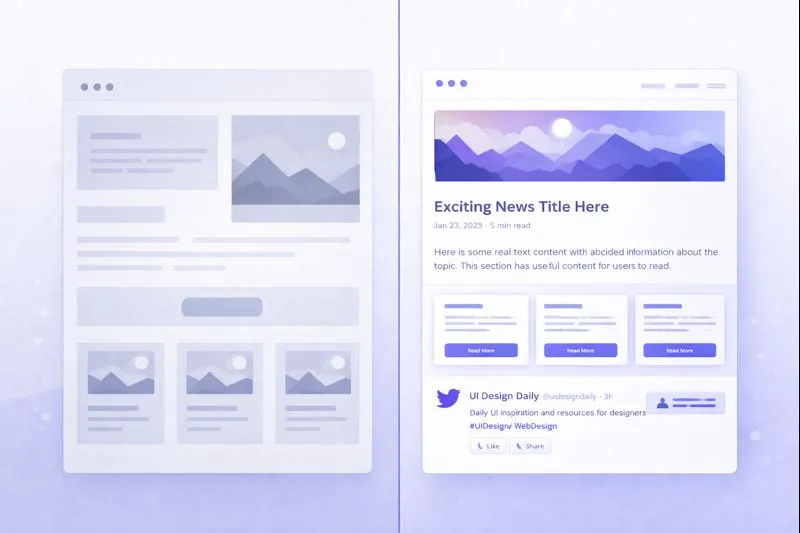
- Low-fidelity wireframes → Minimal or no placeholder
- Mid-fidelity mockups → Moderate, varied placeholder
- High-fidelity prototypes → Real or highly realistic content
Rules of Thumb for Balanced Placeholder Usage
Based on research and industry experience, here are practical rules to guide your placeholder decisions:
Rule 1: The Hierarchy Rule
Use real content for hierarchy-critical elements:
- Headlines (H1, H2)
- Call-to-action buttons
- Navigation labels
- Form labels
- Error messages
- Pricing and key data points
Placeholder is acceptable for:
- Body paragraphs
- Supporting descriptions
- Terms and conditions
- Secondary content
Rule 2: The Stakeholder Rule
Match placeholder to your audience:
| Audience | Placeholder Approach |
|---|---|
| Internal design team | Liberal placeholder use acceptable |
| UX researchers | Minimal placeholder; explain its presence |
| Business stakeholders | Clearly labeled; realistic lengths |
| Clients | Very limited; use representative content |
| End users (testing) | Minimal to none; realistic context essential |
Rule 3: The Project Phase Rule
Adjust placeholder as the project progresses:
Wireframes → Heavy placeholder, focus on structure
Mockups → Moderate placeholder, test layouts
Prototypes → Light placeholder, prepare for real content
Pre-launch → No placeholder, real content only
Rule 4: The "What's Being Tested?" Rule
Ask yourself: What am I trying to learn or validate?
- Testing layout? → Placeholder acceptable
- Testing comprehension? → Real content required
- Testing aesthetics? → Moderate placeholder okay
- Testing usability? → Depends on the task
- Testing accessibility? → Real content required
Rule 5: The Label Everything Rule
Always clearly label placeholder text in shared documents:
[PLACEHOLDER: Product description - expect ~50 words]
[SAMPLE HEADLINE: Actual headline pending client approval]
[LOREM IPSUM: Body copy to be provided by content team]
This prevents confusion and sets appropriate expectations.
Practical Examples: Applying Balance
Example A: E-commerce Product Page
Poor approach: Lorem Ipsum for product name, description, specifications, reviews, and pricing.
Balanced approach:
- Real: Product name ("Nike Air Max 2025"), price ("$179.99"), sizes ("US 7-13")
- Realistic placeholder: Product description (~100 words, technical language style)
- Varied reviews: 5-star short review, 3-star medium review, 1-star long review
- Lorem Ipsum only for: Legal disclaimers, shipping policy details
Example B: SaaS Dashboard
Poor approach: Lorem Ipsum for all chart labels, metrics, and notifications.
Balanced approach:
- Real: Navigation items, metric labels ("Monthly Revenue," "Active Users")
- Realistic numbers: "$12,450" instead of "Lorem"
- Real dates: "Jan 10, 2026" instead of "Ipsum"
- Placeholder only for: Longer descriptions, help text, changelog entries
Example C: Blog or Content Site
Poor approach: Lorem Ipsum for all article titles, excerpts, and body content.
Balanced approach:
- Real: Article titles that represent actual content style
- Realistic excerpts: Written to match tone (formal, casual, technical)
- Varied lengths: Short posts (300 words), long posts (2000 words)
- Real author names and dates
- Placeholder only for: Comment text (but realistic lengths)
The Moderation Mindset
Ultimately, balanced placeholder usage comes down to a moderation mindset. Neither extreme—avoiding placeholder entirely or using it everywhere—serves your design process well.
Signs You're Using Too Much Placeholder
- Stakeholders can't visualize the final product
- User testing yields unreliable results
- Designs break when real content arrives
- Teams underestimate content requirements
- Accessibility issues are discovered late
Signs You're Using Too Little Placeholder
- Design work is blocked waiting for content
- Designers are writing content instead of designing
- Early exploration is constrained by available copy
- Layout experimentation is limited
- Teams are paralyzed by content dependencies
The Golden Middle Path
The most effective designers use placeholder text as a flexible tool—neither crutch nor constraint. They:
- Start with placeholder to enable rapid exploration
- Introduce realistic content progressively
- Test with content variations
- Replace placeholder systematically as projects mature
- Verify all placeholder is removed before launch
Conclusion: Intentional Placeholder Usage
Placeholder text is not inherently good or bad—it's a tool whose value depends entirely on how you use it. By understanding cognitive load, anticipating layout distortion, and considering user testing implications, you can make intentional decisions about when, where, and how much placeholder text to use.
Key takeaways:
- Cognitive load matters: Placeholder text has a psychological cost; use it purposefully
- Layouts lie: Uniform Lorem Ipsum creates false confidence in your designs
- Testing requires context: Match placeholder usage to what you're trying to learn
- Rules of thumb help: Apply the hierarchy, stakeholder, phase, and labeling rules
- Moderation wins: Neither too much nor too little—find the balance for each context
The goal isn't to eliminate placeholder text but to use it wisely—as a bridge to real content, not a destination in itself.
Ready to generate balanced, customizable placeholder text for your designs? Try Lorem Genius to create placeholder content that serves your design process without distorting your results.