Design · 2026-01-24 · 7 min read
Lorem Ipsum for Wireframes vs High-Fidelity Mockups

Software Engineer, architect, and systems designer
Software Engineer with over 10 years of industry experience, working across architecture and system design. Builds Lorem Genius under Ashika Labs.
Lorem Ipsum for Wireframes vs High-Fidelity Mockups
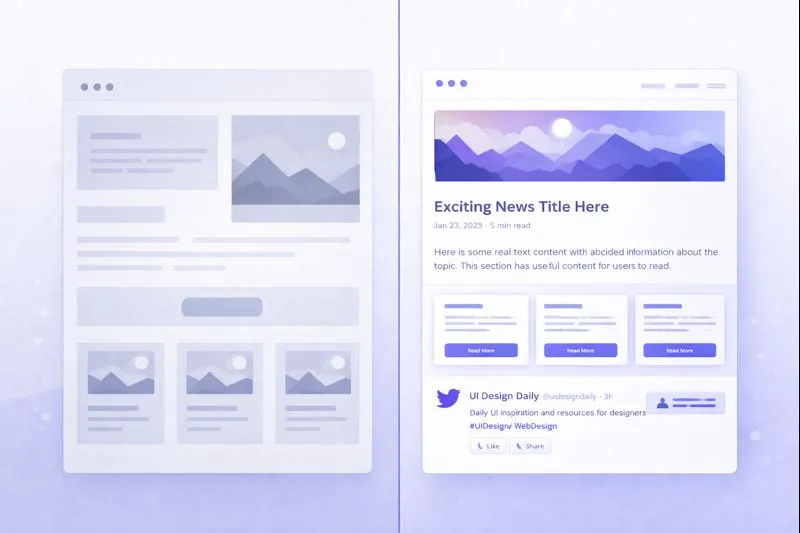
Placeholder text serves different purposes at different stages of the design process. What works in a quick wireframe may be completely wrong for a polished mockup ready for client review. Understanding these differences is crucial for efficient workflows and clear stakeholder communication.
This guide explores how to approach placeholder text at each design fidelity level, and how to manage expectations throughout the design lifecycle.
The Design Fidelity Spectrum
Before diving into specifics, let's define the fidelity levels:
| Level | Purpose | Typical Tools |
|---|---|---|
| Low-Fi Wireframes | Structure, layout, hierarchy | Pen/paper, Balsamiq, Whimsical |
| Mid-Fi Wireframes | Refined layout, basic interactions | Figma, Sketch, Adobe XD |
| High-Fi Mockups | Visual design, near-final appearance | Figma, Sketch, Photoshop |
| Prototypes | Interactive, user testing ready | Figma, Framer, Principle |
Each stage has different placeholder text requirements.
Low-Fidelity Wireframes
Low-fi wireframes are about structure, not polish. Placeholder text here should be:
Characteristics
- Dense and generic - Focus on layout, not content
- Visually distinct - Clear text blocks without distraction
- Quickly generated - Speed matters at this stage
- Approximate in length - Rough content sizing
What to Use
For low-fi wireframes, simple placeholders work best:
[Headline]
[Subheadline text goes here, approximately two lines]

[Body text paragraph that represents roughly
the amount of content expected in this area]

[CTA Button]
Or use short, dense Lorem Ipsum blocks:
Lorem ipsum dolor sit amet, consectetur adipiscing elit.
Sed do eiusmod tempor incididunt ut labore.
Try our Wireframe generator for dense, compact placeholder text perfect for low-fidelity mockups.
Stakeholder Expectations
At the wireframe stage, communicate clearly:
"This wireframe shows the page structure and content hierarchy. The actual text is placeholder—we're focusing on layout and flow, not copy."
Common stakeholder questions:
- "What will the headline say?" → "We'll define that in the content strategy phase."
- "Why Latin text?" → "It helps us focus on structure without reading the words."
- "Is this the final design?" → "No, this shows structure only. Visual design comes next."
Mid-Fidelity Wireframes
Mid-fi wireframes bridge structure and design. Placeholder text becomes more important:
Characteristics
- Realistic lengths - Content should approximate final copy
- Varied text blocks - Different lengths for different elements
- Hierarchy indicators - Headlines vs body text distinction
- Interaction hints - Labels, buttons, form fields
What to Use
Start mixing content types:
Hero Headline (5-8 Words)
Supporting subheadline that provides more context
about the value proposition in roughly 15-20 words.

Feature Title
Description text that explains this feature's
benefit to the user in a concise paragraph.

[Primary Action] [Secondary Action]
Stakeholder Expectations
Mid-fi reviews often trigger content discussions:
"These wireframes show refined layouts with realistic text lengths. While the words are placeholder, the amount of text represents what we expect in each section."
Set expectations:
- Content lengths are intentional
- Layout accommodates expected copy
- Real content comes in the next phase
High-Fidelity Mockups
High-fi mockups represent near-final visual designs. Placeholder text standards increase significantly:
Characteristics
- Realistic content lengths - Must match expected final copy
- Context-appropriate text - Relevant to the product/industry
- Varied and natural - No obvious repetition
- Typography showcasing - Text demonstrates font choices
What to Use
At this stage, consider:
Option 1: Industry-appropriate Lorem Ipsum
Use generators that match your project's tone:
- Standard for professional/corporate
- Hipster for trendy/lifestyle brands
- Business jargon for B2B
Option 2: Sample content
Write brief placeholder content that mimics real copy:
Transform Your Workflow Today
Our platform helps teams collaborate 30% faster
with intelligent automation and real-time sync.

✓ Unlimited projects
✓ Advanced analytics
✓ 24/7 support

[Start Free Trial]
Option 3: Content-first approach
Work with copywriters to have real content before the high-fi phase.
For polished mockups, try our UI Mockup generator which creates short, interface-friendly text blocks.
Stakeholder Expectations
High-fi mockups require careful framing:
"This mockup shows the visual design with placeholder text. The typography, spacing, and overall aesthetic are near-final. Copy will be provided separately."
Important distinctions:
- Design is (nearly) final
- Copy is NOT final
- Layout will work with real content
- Minor adjustments may occur with actual text
Comparison Table: Text Requirements by Stage
| Aspect | Wireframes | High-Fi Mockups |
|---|---|---|
| Length accuracy | Approximate | Must be precise |
| Style matching | Not important | Should match brand |
| Repetition | Acceptable | Should be avoided |
| Variety | Minimal needed | Maximum variety |
| Client reaction | Expected confusion | May be mistaken for final |
| Generation speed | Priority | Less important |
Common Mistakes by Design Stage
Wireframe Mistakes
- Too much detail - Wireframes with perfectly crafted placeholder text waste time
- Real content too early - Clients focus on words, not structure
- Inconsistent lengths - Makes layout decisions unreliable
- Skipping text entirely - "Lorem" boxes don't show real space needs
High-Fi Mockup Mistakes
- Generic Lorem Ipsum - Doesn't showcase typography properly
- Repeated paragraphs - Looks unprofessional to clients
- Wrong content lengths - Creates false expectations
- Placeholder in CTAs - Buttons should always have real text
Handoff Implications
How you handle placeholder text affects development handoff:
For Wireframes
- Annotate expected content types
- Note character limits if relevant
- Provide content structure documentation
- Include component naming conventions
For High-Fi Mockups
- Replace placeholder before handoff (ideally)
- Document where real content is still needed
- Provide text style guidelines
- Include responsive text considerations
Developer Communication
| Stage | Developer Needs |
|---|---|
| Wireframes | Component structure, max character estimates |
| High-Fi | Exact text styles, responsive breakpoint behavior |
| Handoff | Final content OR clear placeholder indicators |
Workflow Recommendations
Ideal Process
- Wireframes → Use dense, generic placeholder text
- Client Review → Explain placeholder purpose
- High-Fi Design → Use realistic, varied placeholder text
- Content Integration → Replace with real copy
- Final Review → Verify text fits design
- Handoff → Provide complete content
Parallel Workstreams
Consider running design and content in parallel:
Week 1: Wireframes + Content Strategy
Week 2: High-Fi Design + Copywriting
Week 3: Content Integration + Review
Week 4: Final Handoff
Stakeholder Communication Templates
Wireframe Presentation
"Today's review focuses on page structure and user flow. You'll notice placeholder text throughout—this is intentional. We're establishing where content lives and how it's organized. Copy development happens in the next phase."
High-Fi Presentation
"This mockup represents our visual direction with placeholder content. The design, typography, and spacing are near-final. We'll integrate actual copy in the next iteration, which may require minor adjustments."
Pre-Handoff Communication
"Before handing off to development, we need to finalize: [list of placeholder sections]. Once real content is provided, we'll update the mockups and proceed to build."
Tools and Resources
Match your tools to your fidelity level:
For Wireframes:
- Wireframe generator - Dense, compact placeholder text
- Quick copy-paste for speed
For High-Fi Mockups:
- UI Mockup generator - Interface-optimized text blocks
- Landing Page generator - Structured page sections
- Blog Article generator - Content page placeholders
For Documentation:
- Document generator - Formal, balanced paragraphs
Conclusion
Placeholder text isn't one-size-fits-all. Wireframes need speed and structure focus, while high-fidelity mockups demand realism and variety. By matching your placeholder text approach to your design stage, you'll:
- Work more efficiently - Right content at the right time
- Communicate better - Clear stakeholder expectations
- Handoff smoothly - Developers get what they need
- Design more accurately - Layouts accommodate real content
Remember: placeholder text is a design tool. Use it strategically at each stage of your process, and always communicate its purpose to stakeholders. The goal is great design that works with real content—Lorem Ipsum just helps you get there.